
Limited time free access: Get started with Bill Pay today.
Bill Pay
Pay bills. No frills.
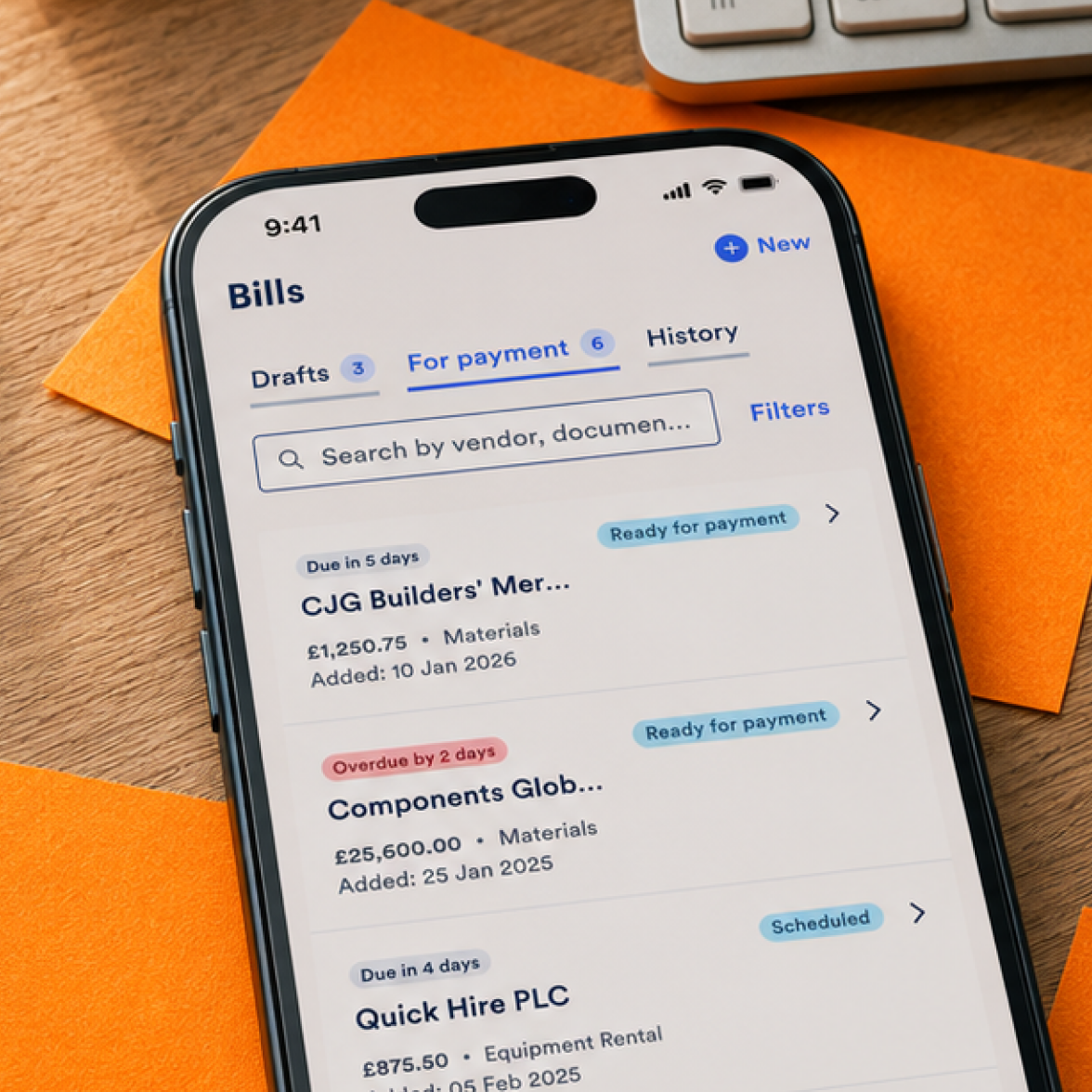
No more endless emails, spiralling spreadsheets or awkward additional tools – upload, manage, and pay your bills all in your account with Bill Pay.

Designed with you in mind
We know how much time it takes swapping between invoices, accounting tools, spreadsheets and online banking. And then there’s manually creating payments, checking supplier details... the list goes on.
That’s where Bill Pay comes in.
Save time – reduce admin and cut down on manual payment set up.
Better organisation – review due dates and payment statuses in one place.
More control – choose what gets paid and when, and feel cashflow confident.
Fewer errors – we’ll automatically pull details from your invoices and check it against Xero.
How does it work?
You might wonder why you haven’t always paid your bills like this.
Step one
Give us your invoices
Pay your suppliers, staff and contractors all at once by uploading your invoices to online banking, or just forward the emails to us.
Step two
Let us do the work
We’ll pull the information from each invoice like the supplier, amount, due date and VAT rate – all ready for you to check. We can also pull invoices from Xero that are ready to be paid.
Step three
Review and schedule
We’ll prompt you to review the bill and then prepare a payment draft for you to review and schedule. And it all syncs with your accounting software too.
Integrates with Xero fuss
Bill Pay links with Xero, which means we can match your invoices with details you have on there already. It also means once you’ve paid a bill, any information will automatically sync.
We’ll be looking to integrate with QuickBooks, FreeAgent and Sage soon.
How to get started
Log into your online banking, head to Settings, scroll down to Business, and enable Bill Pay. Or, watch the demo for more information.
Frequently asked questions
Which accounting software does Bill Pay work with?
Bill Pay currently works with Xero.
The first version of Bill Pay launches with Xero integration, so supplier and accounting data can be pulled from Xero, and payment information can sync back once a bill is paid.
We plan to support more accounting platforms in the future, and we’ll let you know when more integrations become available.
Does Bill Pay replace Xero?
No. Bill Pay works alongside Xero.
Xero remains your accounting system and source of truth for reporting, reconciliation and compliance. Bill Pay helps with the banking side of the workflow: getting invoices into Allica, preparing payments, scheduling payments and syncing the relevant payment information back to Xero.
What happens after I upload an invoice?
Bill Pay extracts the key details from the invoice, such as supplier, amount, due date and VAT information where available.
You can then:
- Review the extracted details
- Add or correct any missing information
- Prepare the payment
- Choose when to pay
- Sync the result back to Xero once ready or paid
Bill Pay does not automatically pay invoices just because they have been uploaded. You stay in control of what gets paid and when.
Expand for more answers +
Help, my question isn’t answered here.
Don’t worry, find the answer in our Help Centre or speak to our team on 0330 094 3333.
